ETS2 Iveco Eurotech _e_Stralis_HD_1999-2006
Descriptions:
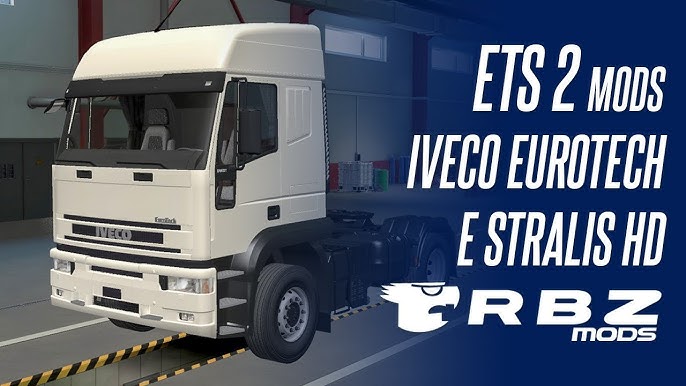
You’re asking about a very specific and popular era of Iveco trucks in Euro Truck Simulator 2, encompassing both the **Iveco Eurotech** and the **Iveco Stralis HD (Heavy Duty)** models produced roughly between 1999 and 2006.
These trucks were workhorses across Europe and, importantly, in Brazil, often seen hauling a wide variety of cargo. While SCS Software (the developers of ETS2) includes some modern Iveco models (like the Stralis Hi-Way and S-Way) in the base game, these older generations are **community-made mods**.
Here’s what you can expect from an ETS2 mod featuring the Iveco Eurotech and Stralis HD from that era:
**Key Characteristics:**
* **Distinctive Design:** Both the Eurotech and the early Stralis HD have a recognizable, robust, and somewhat angular design that sets them apart from newer, more aerodynamic trucks.
* **Brazilian Appeal:** These models were very common in Brazil during their active years, making them highly sought-after mods by the Brazilian ETS2 community. You’ll often find these mods include customization options and accessories tailored to the Brazilian trucking culture.
* **”Heavy Duty” Feel:** These trucks were built for tough jobs, and good mods will aim to convey that with their physics, engine options, and sound.
**What to Expect from a Good Mod (Often “RBZ Mods” or similar):**
* **Dual Truck in One Mod:** As seen in search results (e.g., from RBZ Mods), it’s common for a single mod to include *both* the Iveco Eurotech and the early Stralis HD, allowing you to switch between them.
* **Detailed Models:** Expect high-quality 3D models for both the exterior and interior, striving for authenticity. This includes accurate dashboards, textures, and lighting.
* **Multiple Cabin Types:** You might find options for different cabin heights (e.g., low, normal, high roof) to match various real-world configurations.
* **Chassis Variety:** Common chassis configurations like 4×2, 6×2 (with liftable axles), and sometimes 6×4 for heavy hauling.
* **Engine & Transmission Options:** A range of realistic engine options (with varying horsepower) and corresponding ZF or similar transmissions.
* **Custom Sound Packs (Crucial!):** This is vital for immersion. Good mods will feature custom FMOD sound sets that accurately replicate the distinct engine and exhaust notes of these Iveco trucks. For the Brazilian context, this often includes “ronco direto” (straight pipe) sounds.
* **Extensive Customization:** This is usually a highlight. Look for:
* Different grilles, bumpers, and side skirts.
* Various mirrors, headlights, and taillights.
* Many accessory slots for lights (LEDs, markers), antennas, “rodoar” (tire inflation system), and other decorations.
* Interior customization with different upholstery, dashboard materials, and various cabin accessories (often compatible with SCS’s Cabin Accessories DLC).
* Skin support for custom paint jobs and company liveries.
* **Compatibility:** Modders regularly update these popular trucks to ensure they work with the latest ETS2 game versions (e.g., 1.54.x, as the current time indicates it’s June 2025, and 1.54 is the latest stable version). Always check the mod’s description for compatibility.
**Where to Find These Mods:**
* **Brazilian Modding Websites/YouTube Channels:** Given the strong Brazilian presence of these trucks, many mods are created and distributed by Brazilian modders. Look for channels like **RBZ Mods**, Carga Simulada, and others on YouTube, or dedicated Brazilian ETS2 mod sites. They often provide direct download links in video descriptions.
* **General ETS2 Mod Sites:** Websites like ETS2.lt, World of Mods, and SCSMods might also host versions of these trucks.
* **Paid Mods (“Mods Pagos”):** As with many high-quality and constantly updated Brazilian truck mods, some versions of the Eurotech/Stralis HD might be offered as paid mods. These often provide superior detail and ongoing support.
**Installation Process:**
1. **Download:** Get the `.scs` file(s) of the mod.
2. **Place in Mod Folder:** Copy the `.scs` file(s) into your ETS2 mod directory, typically found at `Documents\Euro Truck Simulator 2\mod`.
3. **Activate in Mod Manager:** Launch ETS2, go to the “Mod Manager” from the profile selection screen, and activate the Iveco Eurotech/Stralis mod(s). Pay attention to any specific load order instructions from the mod creator.
4. **Purchase In-Game:** Once activated, you should be able to purchase the truck from an Iveco dealer in the game, or sometimes from a dedicated “mod dealer.”
These Iveco models offer a great way to experience a different flavor of European (and Brazilian-influenced) trucking in ETS2, especially if you appreciate older, more rugged trucks.
Authors:
rzk
Download Link: Download mod
* By clicking [Download mod] button you agree to leave this website. The link opens in the new tab. File is hosted in the external website. We are not responsible for the content of the external page and the possibility of free download of the file.