Volvo VM Cavalo Mecanico ETS2
Descriptions:
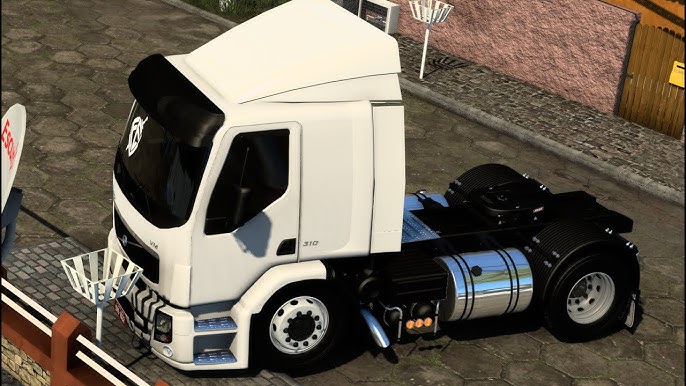
The **Volvo VM “Cavalo Mecânico”** is a very popular truck in Brazil, known for its versatility and presence in various segments of the transport industry, from short-haul to medium-distance trips. Naturally, it’s a highly sought-after mod for Euro Truck Simulator 2 (ETS2) among Brazilian players.
When you ask for a “Volvo VM Cavalo Mecânico” mod, you’re looking for the tractor unit version of the truck, designed to pull trailers.
Here’s what you can expect from a good Volvo VM mod for ETS2 and how to find it:
**Common Features of a Volvo VM ETS2 Mod:**
* **Authentic Brazilian Model:** Modders put a lot of effort into replicating the look and feel of the Brazilian-spec Volvo VM, which has distinct characteristics compared to European Volvo trucks.
* **Detailed 3D Model:** High-quality exterior and interior modeling is a must. This includes accurate textures, dashboard details, and working animations (wipers, gauges, lights, etc.).
* **Multiple Chassis Options:** You’ll usually find various chassis configurations, such as:
* **4×2 (Toco):** The standard two-axle tractor.
* **6×2 (Truck or Trucado):** With an extra axle, common for heavier loads.
* **6×4 (Traçado):** With two driven axles, for off-road or very heavy duty.
* Sometimes even **8×2 (Bitruck)** or **8×4** options, though less common for a “cavalo mecânico.”
* **Engine and Transmission Options:** A selection of engines with realistic power outputs (e.g., VM 270, 310, 360 HP) and corresponding gearbox options (manual and I-Shift/automatic).
* **Realistic Sounds:** Custom sound packs that accurately simulate the Volvo VM’s engine, air brakes, horn, and other operational sounds. Many modders prioritize this for immersion.
* **Brazilian-style Customization:** This is where these mods really shine for the Brazilian community:
* **”Arqueado” (Lifted Suspension):** A very popular aesthetic modification in Brazil, making the truck look more aggressive.
* **”Diretão” (Straight Pipes):** Custom exhaust options that produce a louder, more direct sound.
* **Various Accessories:** Specific bumpers, mudguards, antennas, “corta-fumaça” (smoke deflectors), light bars, and other visual enhancements common on Brazilian roads.
* **Skins/Liveries:** Numerous real-world Brazilian transport company paint jobs, along with customizable templates.
* **Compatibility:** Mods are regularly updated to ensure compatibility with the latest ETS2 game versions (e.g., 1.50, 1.51, 1.52, 1.53, 1.54 as of mid-2025).
**Where to Find Volvo VM ETS2 Mods:**
1. **YouTube Channels (Brazilian ETS2 Community):** This is arguably the best place to find high-quality Volvo VM mods. Many Brazilian YouTubers showcase and provide download links (often directly from the modder or through file hosts) for free or paid mods. Search for:
* “Volvo VM ETS2 mod”
* “Volvo VM Qualificado ETS2”
* “Download Volvo VM ETS2 Grátis” (for free versions)
* “Volvo VM Cavalo Mecanico ETS2”
* Look for channels like “Júnior Game,” “Oxente Gamer,” “Rafa Gamers,” and “HenriqueQuality3DMods” (as mentioned in search results, Quality3D is a known creator of VM mods).
2. **Modding Websites:**
* **ETS2.lt:** A general mod repository where you can search for “Volvo VM.”
* **Steam Workshop:** Some versions, like “Volvo VM 2015 – Quality3DMods,” are available on the Steam Workshop, offering easy subscription and automatic updates. Check the compatibility before subscribing.
* **Dedicated Brazilian Modding Sites:** Sites like Modwork Brasil or others might sell or host premium versions of the Volvo VM.
3. **Facebook Groups/Discord Servers:** Many Brazilian ETS2 communities on Facebook and Discord are active in sharing and discussing mods.
**Installation Steps (Standard for ETS2 Mods):**
1. **Download:** Obtain the `.scs` file(s) of the Volvo VM mod. If it’s a compressed file (like `.zip` or `.rar`), extract the `.scs` files first.
2. **Locate Mod Folder:** Navigate to your ETS2 mod directory: `Documents\Euro Truck Simulator 2\mod`.
3. **Place Mod Files:** Copy and paste the `.scs` file(s) directly into this `mod` folder.
4. **Activate in Mod Manager:**
* Launch Euro Truck Simulator 2.
* On the profile selection screen, click “Mod Manager.”
* Find the Volvo VM mod(s) in the “Available Mods” list.
* Double-click on each file or use the arrow to move it to the “Active Mods” column.
* **Load Order:** If the mod comes with multiple files (e.g., a base file, a sound pack, a skin pack, an “arqueado” chassis pack), the mod creator will usually specify the correct load order. Generally, the main truck file goes lower, and sound/accessory packs for that truck go above it.
* Click “Confirm Changes” to apply the changes.
5. **Purchase In-Game:** Load your game profile. Go to any truck dealer in the game, and look for the “Mod Dealer” option (it’s often a button at the bottom of the screen when you select a standard truck brand like DAF or IVECO). From there, you can purchase and customize your new Volvo VM.
Enjoy driving your Volvo VM “Cavalo Mecânico” through the virtual roads of ETS2, especially on Brazilian maps!
Authors:
CLAUDIO GAMER
Download Link: Download mod
* By clicking [Download mod] button you agree to leave this website. The link opens in the new tab. File is hosted in the external website. We are not responsible for the content of the external page and the possibility of free download of the file.